

Overview
ProfileGrid REST API provides a secure integration layer on top of WordPress that allows external applications such as mobile apps, CRMs, automation scripts, or third-party platforms to interact directly with ProfileGrid features. Through these endpoints, developers can manage user groups, assign or remove members, create and control custom registration sections and profile fields, handle membership requests, and perform user account activation or deactivation operations. All API requests are protected through token-based authentication, meaning an access token must first be generated using a valid WordPress user and Application Password, and then included in every subsequent request to ensure that only authorized users can access or modify ProfileGrid data.
Prerequisite
Before using the ProfileGrid WordPress REST API endpoints, ensure that your WordPress website is properly configured and accessible. The ProfileGrid plugin must be installed and activated on your WordPress site, as the REST API endpoints are available only when ProfileGrid is running. Once the plugin is active, you can proceed with the API configuration and authentication steps in the next section.
How to Configure ProfileGrid REST API
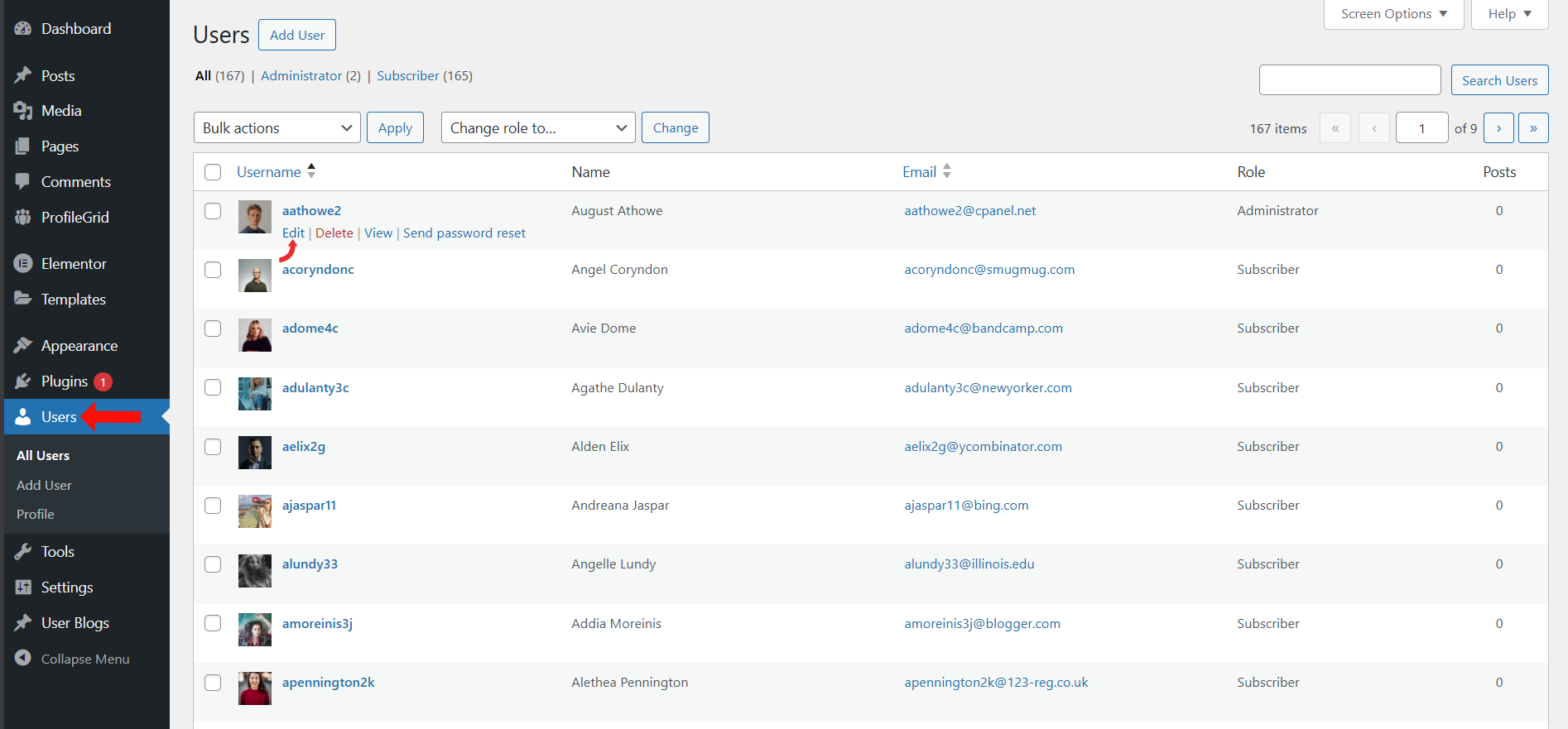
Step 1 — Select User and Click Edit
- Go to Users →All Users in your WordPress dashboard.
- Select the user you want to use for API calls.
- Click the Edit button under the user account.
Step 2 — Create an Application Password
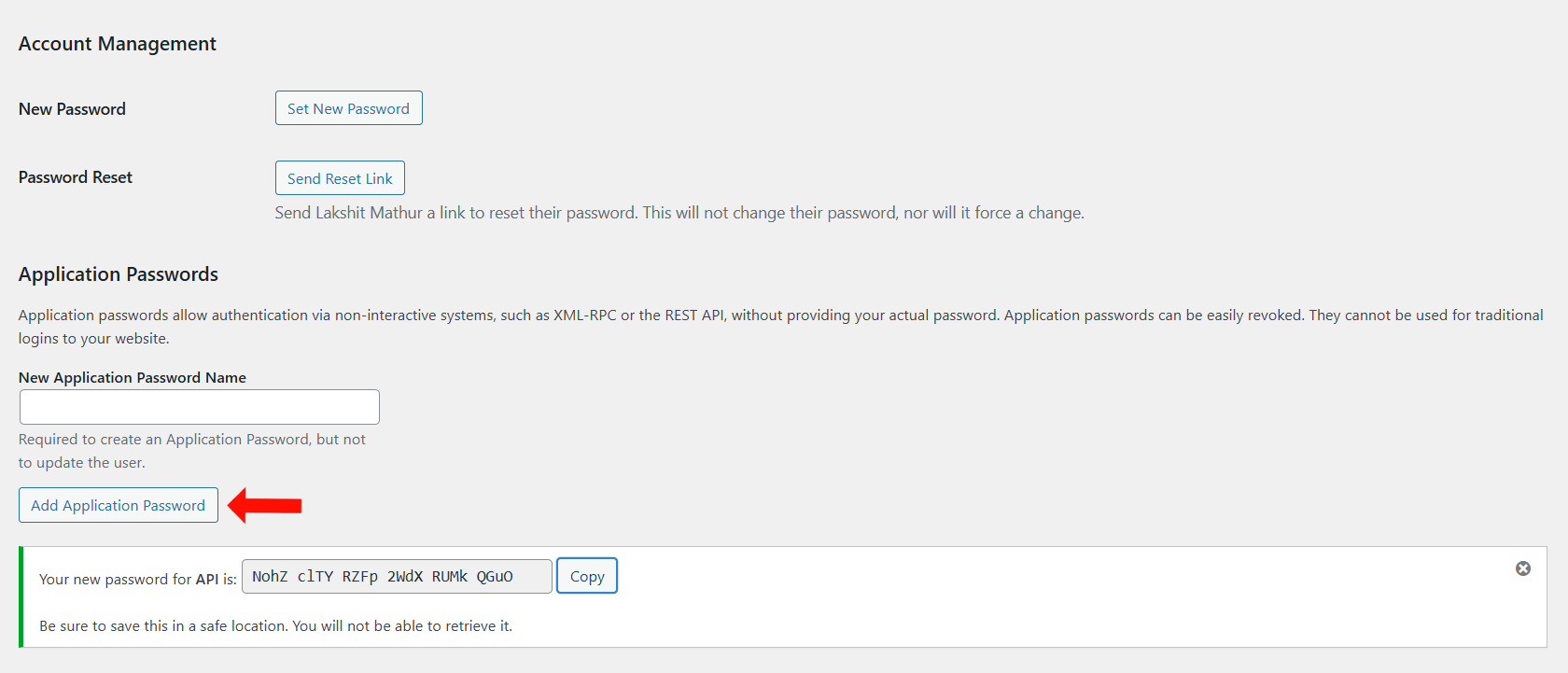
- On the Edit User page, ensure the user has the required role (Administrator, Editor, Author, etc.).
- Scroll down to the Application Passwords section.
- Enter a label such as Postman Integration or ProfileGrid API, then click Add New Application Password.
- Copy the generated password immediately, as it will only be shown once.
- This Application Password is required to generate the ProfileGrid API access token.
Step 3 — Enable ProfileGrid REST API
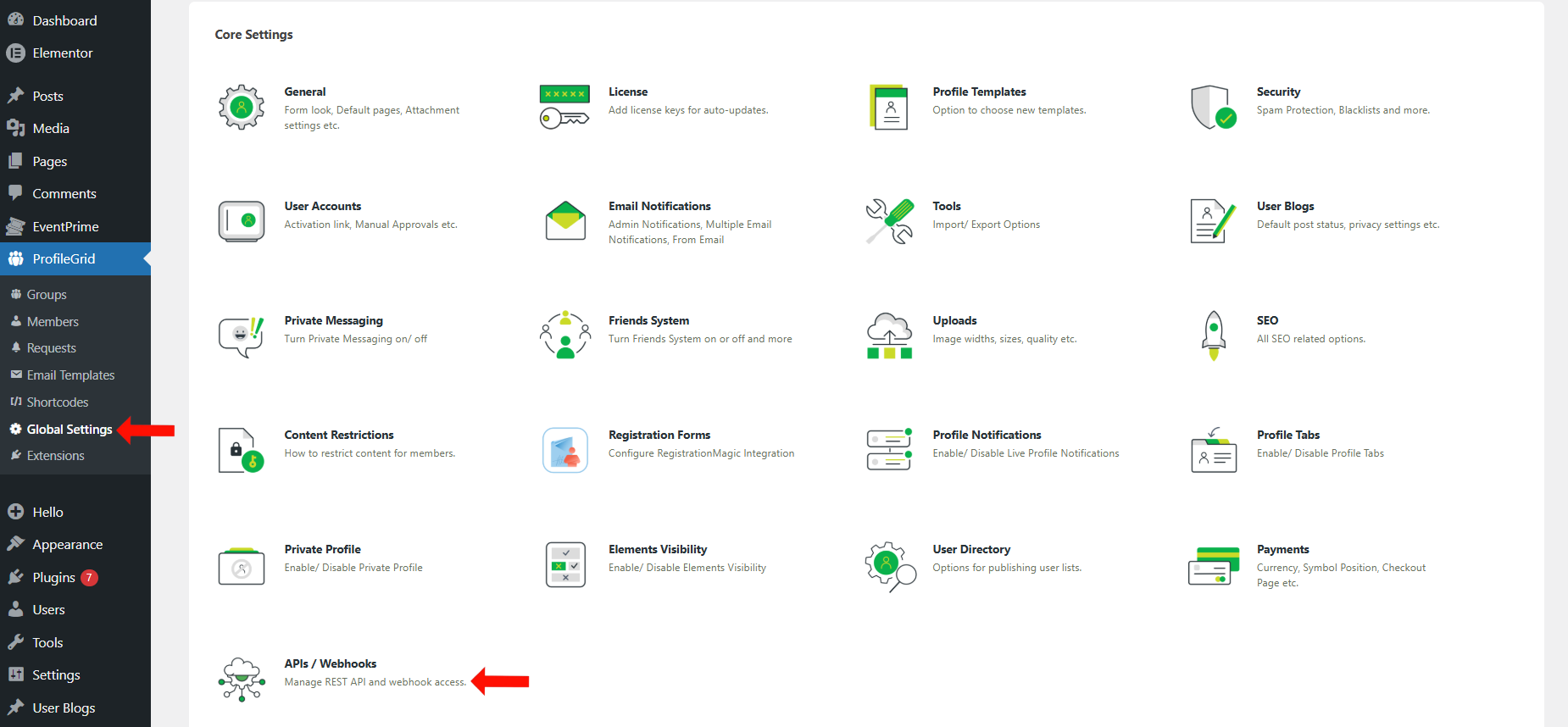
- Navigate to ProfileGrid menu → Global Settings submenu.
- On the Global Settings page, locate and click APIs / Webhooks.
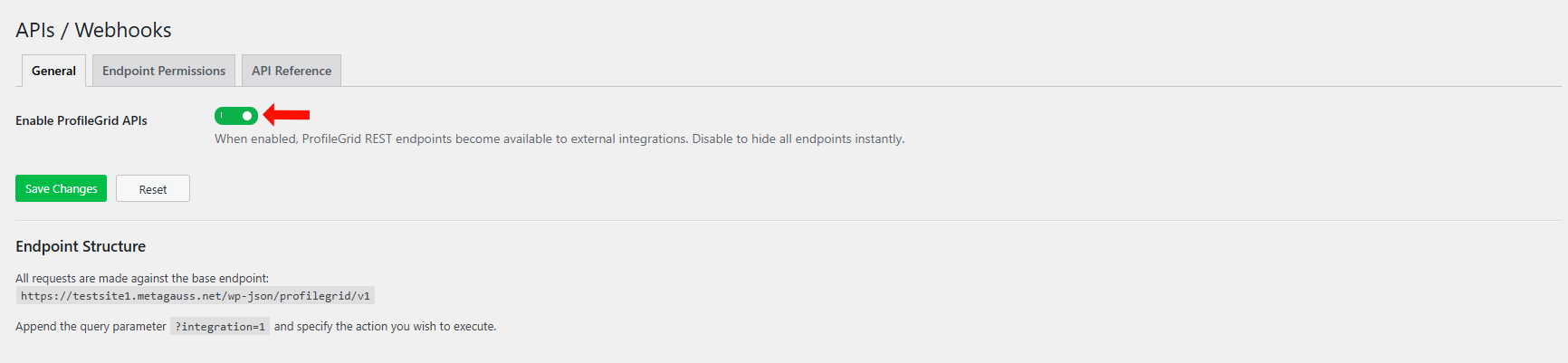
- On the APIs / Webhooks Settings page, enable the toggle for Enable ProfileGrid APIs.
- Click Save Changes.
Until this setting is enabled, the ProfileGrid REST API endpoints will not function.
Step 4 — Configure Endpoint Permissions
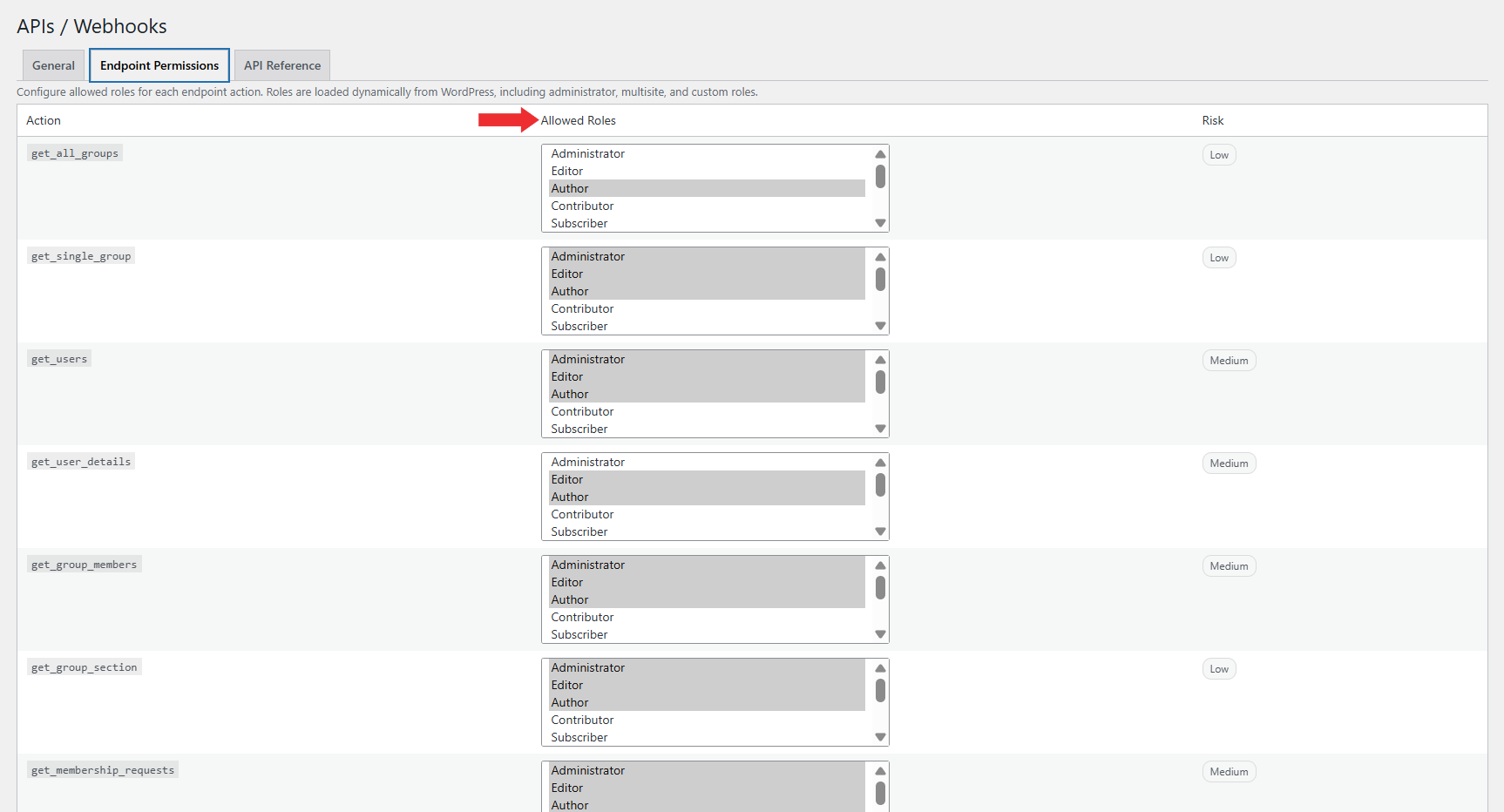
ProfileGrid provides an additional authorization layer through the Endpoint Permissions tab available under APIs / Webhooks. This allows administrators to control which WordPress user roles are allowed to access specific REST API actions.
By default, the following roles have access to all REST API endpoints:
- Administrator
- Editor
- Author
Each API action is listed individually, and permissions can be configured per action to control access more precisely.
- Navigate to ProfileGrid menu and select Global Settings submenu.
- Open APIs / Webhooks.
- Click the Endpoint Permissions tab.
- For each API action, select or unselect the roles that should be allowed to access that endpoint.
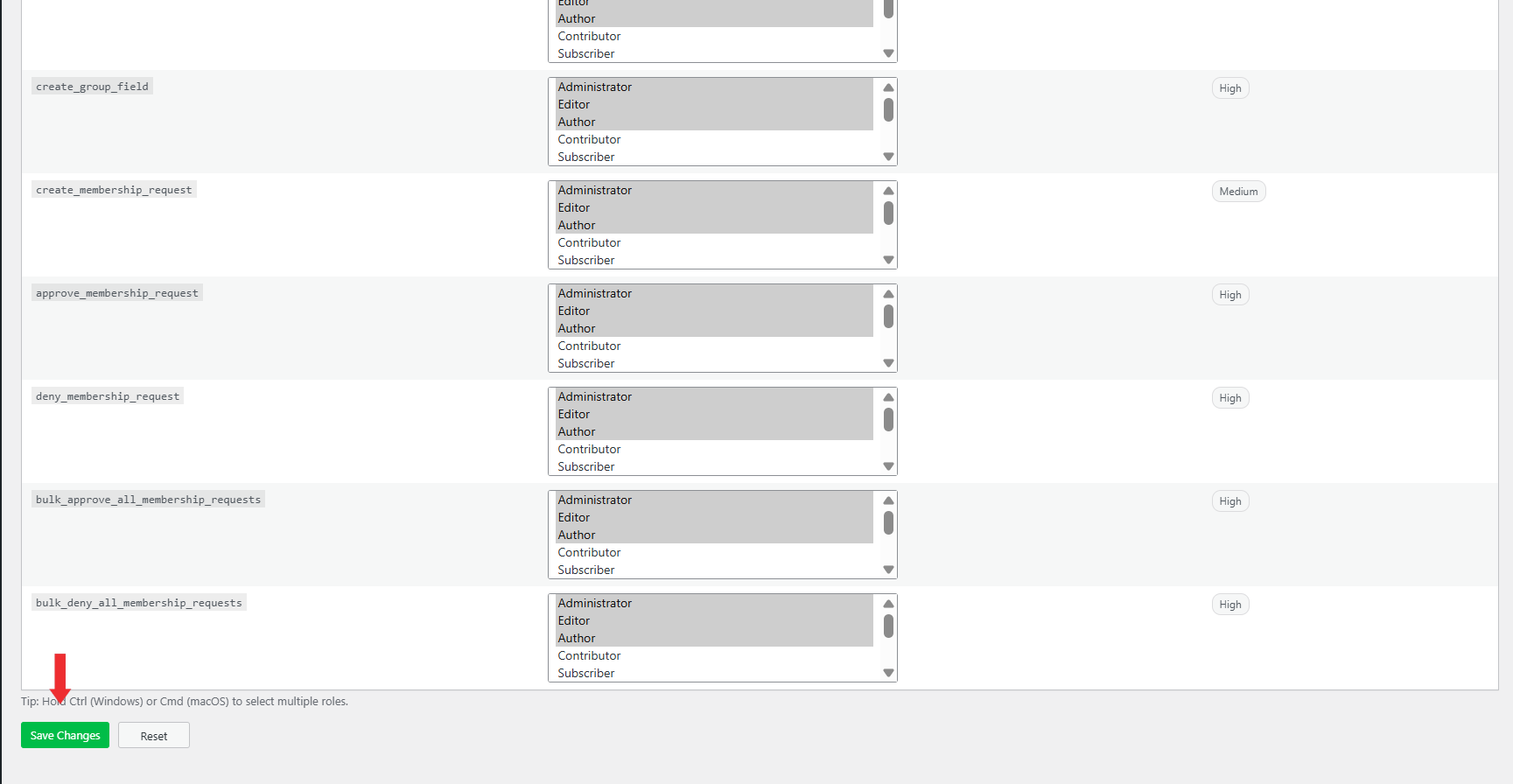
- Click the Save Changes button to apply the updated permission settings.
A Reset button is also available in this tab. Clicking this button restores all endpoint permissions to their default configuration, where Administrator, Editor, and Author roles are allowed access to all REST API endpoints.
This role-based access control works along with token-based authentication, ensuring that access to each endpoint depends on both a valid token and the assigned role permissions.
Step 5 — View API Reference
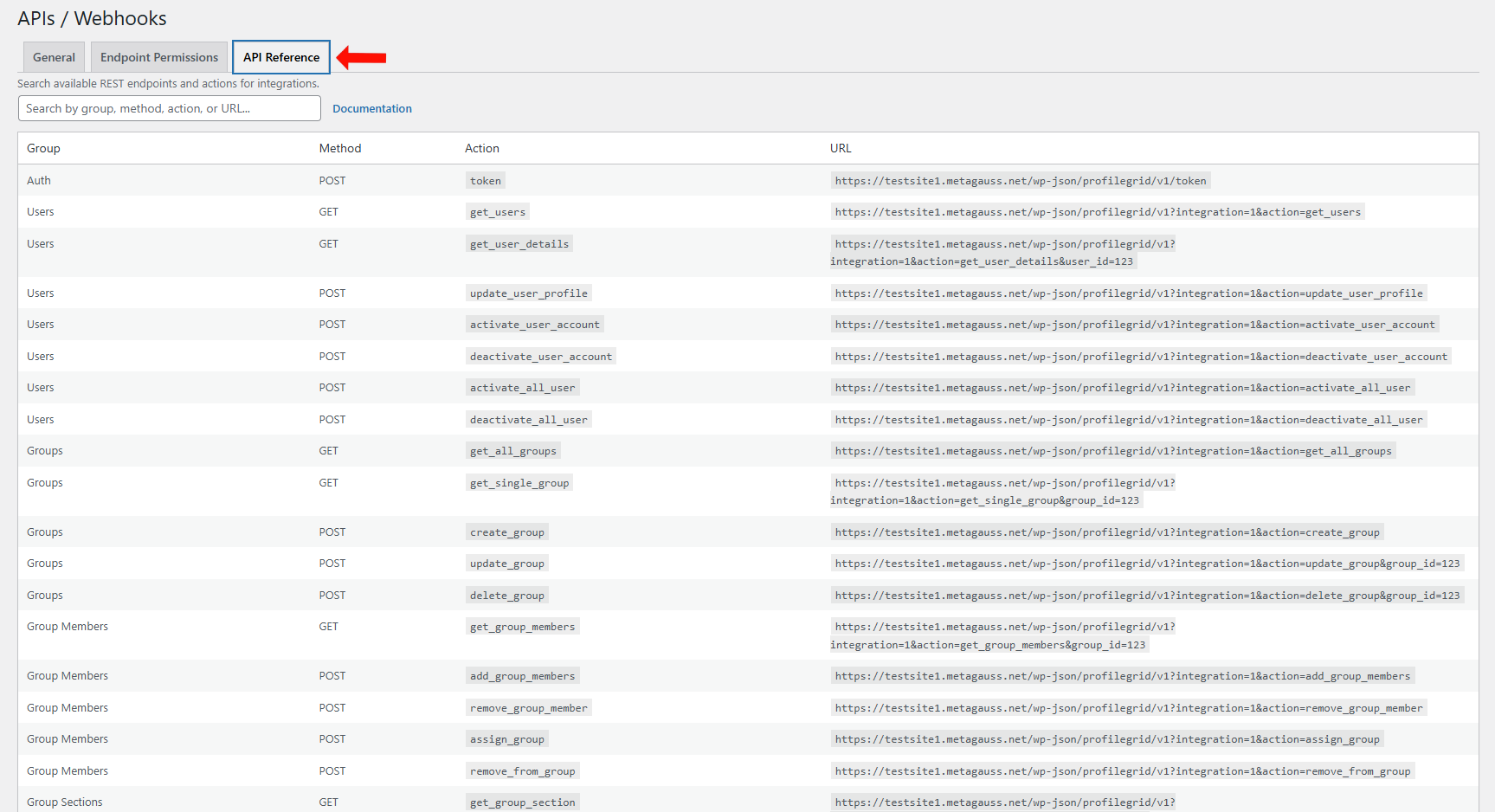
ProfileGrid includes an API Reference tab under APIs / Webhooks, which provides a complete list of all available REST API endpoints.
This tab displays the following details for each endpoint:
- Group
- HTTP Method
- Action
- Endpoint URL
- Navigate to ProfileGrid menu and select Global Settings submenu.
- Open APIs / Webhooks.
- Click the API Reference tab.
A search field is available at the top of the page to quickly locate endpoints by group, method, action, or URL.
A Documentation link is also provided within this tab, allowing direct access to the detailed API documentation for reference.
Step 6 — Working with ProfileGrid REST API Endpoints
1. Authentication Endpoint
1.1 Get Access Token
Purpose: Obtain authentication token using WordPress Application Password.
Base URL: {YOUR_SITE_URL}/wp-json/profilegrid/v1/token
HTTP Method: POST
Headers Required:
http
Content-Type: application/json
Request Body (JSON):
json
{
    "username": "YOUR_WORDPRESS_USERNAME",
    "application_password": "YOUR_APPLICATION_PASSWORD"
}
cURL Example:
bash
curl -X POST "http://yoursite.com/wp-json/profilegrid/v1/token" \
  -H "Content-Type: application/json" \
  -d '{
    "username": "admin",
    "application_password": "abcd efgh ijkl mnop qrst uvwx"
  }'
Successful Response (200 OK):
json
{
    "token": "eyJ0eXAiOiJKV1QiLCJhbGciOiJIUzI1NiJ9.eyJpc3MiOiJodHRwczovL2V4YW1wbGUuY29tIiwiaWF0IjoxNTE2MjM5MDIyfQ.SflKxwRJSMeKKF2QT4fwpMeJf36POk6yJV_adQssw5c",
    "user_id": 1
}
Error Responses:
- 401 Unauthorized – Invalid credentials
- 400 Bad Request – Missing required fields
- 403 Forbidden – Application password not enabled for user
Important Notes:
- Save the
tokenvalue for all subsequent API calls - Tokens expire after 2 minutes
- Use either
PG-TokenorAuthorization: Bearerheader format for token usage
2. Group Management Endpoints
2.1 Get All Groups
Purpose: Retrieve list of all user groups with pagination support.
Base URL: {YOUR_SITE_URL}/wp-json/profilegrid/v1/integration
HTTP Method: GET
Query Parameters:
http
integration=1
action=get_all_groups
page=1          # Optional: Page number (default: 1)
per_page=20     # Optional: Items per page (default: 20)
Headers Required:
http
PG-Token: YOUR_TOKEN_HERE
# OR
Authorization: Bearer YOUR_TOKEN_HERE
cURL Example:
bash
curl -X GET \
  "http://yoursite.com/wp-json/profilegrid/v1/integration?integration=1&action=get_all_groups&page=1&per_page=10" \
  -H "PG-Token: eyJ0eXAiOiJKV1QiLCJhbGciOiJIUzI1NiJ9..."
Successful Response (200 OK):
json
{
    "data": [
        {
            "id": "14",
            "group_name": "Marketing Group",
            "group_desc": "Group description here...",
            "associate_role": "subscriber",
            "members_count": 16,
            "group_options": {
                "group_type": "closed",
                "group_price": "1000",
                "is_paid_group": "1"
            }
        },
        {
            "id": "15",
            "group_name": "Developers",
            "group_desc": "Developer community group",
            "associate_role": "contributor",
            "members_count": 8,
            "group_options": {
                "group_type": "open",
                "group_price": "0",
                "is_paid_group": "0"
            }
        }
    ],
    "pagination": {
        "page": 1,
        "per_page": 10,
        "total": 45,
        "total_pages": 5
    }
}
Error Responses:
- 401 Unauthorized – Invalid or missing token
- 403 Forbidden – Insufficient permissions
2.2 Get Single Group
Purpose: Retrieve detailed information about a specific group.
Base URL: {YOUR_SITE_URL}/wp-json/profilegrid/v1/integration
HTTP Method: GET
Query Parameters:
http
integration=1
action=get_single_group
group_id=14    # Required: ID of the group to retrieve
Headers Required:
http
PG-Token: YOUR_TOKEN_HERE
cURL Example:
bash
curl -X GET \
  "http://yoursite.com/wp-json/profilegrid/v1/integration?integration=1&action=get_single_group&group_id=14" \
  -H "PG-Token: eyJ0eXAiOiJKV1QiLCJhbGciOiJIUzI1NiJ9..."
Successful Response (200 OK):
json
{
    "id": "14",
    "group_name": "Marketing Group",
    "group_desc": "Lorem ipsum dolor sit amet...",
    "group_icon": "26",
    "is_group_limit": "1",
    "group_limit": "399",
    "associate_role": "subscriber",
    "is_group_leader": "1",
    "group_leaders": {
        "primary": "150"
    },
    "group_slug": null,
    "show_success_message": "1",
    "success_message": "Thank you for signing up.",
    "group_options": {
        "group_type": "closed",
        "group_page": "0",
        "group_price": "1000",
        "is_paid_group": "1",
        "enable_notification": "1"
    },
    "members": [
        {
            "id": 162,
            "user_login": "adome4c",
            "display_name": "adome4c",
            "email": "adome4c@bandcamp.com",
            "avatar": "https://secure.gravatar.com/avatar/..."
        }
    ],
    "members_count": 16,
    "sections": [
        {
            "id": "21",
            "section_name": "Personal Details",
            "ordering": "17",
            "fields": [
                {
                    "field_id": "84",
                    "field_name": "Email",
                    "field_type": "user_email",
                    "is_required": "1",
                    "field_key": "user_email"
                }
            ]
        }
    ]
}
Error Responses:
- 404 Not Found – Group ID does not exist
- 401 Unauthorized – Invalid or missing token
- 403 Forbidden – Insufficient permissions to view group
2.3 Create Group
Purpose: Create a new user group with custom configuration.
Base URL: {YOUR_SITE_URL}/wp-json/profilegrid/v1/integration
HTTP Method: POST
Query Parameters:
http
integration=1
action=create_group
Headers Required:
http
PG-Token: YOUR_TOKEN_HERE
Content-Type: application/json
Request Body (JSON) – Required Fields:
json
{
    "group_name": "Premium Members",
    "group_desc": "<p>Exclusive premium membership group</p>",
    "associate_role": "subscriber"
}
Request Body (JSON) – Full Example with Optional Fields:
json
{
    "group_name": "Premium Members",
    "group_desc": "<p>Exclusive premium membership group created via API.</p>",
    "group_icon": 0,
    "is_group_limit": 1,
    "group_limit": 50,
    "group_limit_message": "Membership limit reached for this premium group.",
    "associate_role": "subscriber",
    "is_group_leader": 1,
    "leader_username": "admin",
    "group_leaders": ["admin"],
    "leader_rights": [],
    "group_slug": "premium-members",
    "show_success_message": 1,
    "success_message": "Your premium membership request has been received.",
    "group_options": {
        "is_paid_group": "1",
        "group_price": "499",
        "is_super_group": "0",
        "enable_notification": "1",
        "on_registration": "",
        "on_request_denied": "",
        "on_user_activate": "",
        "enable_group_admin_notification": "1",
        "display_name": "1",
        "enable_prefix": "0",
        "enable_postfix": "0"
    }
}
cURL Example:
bash
curl -X POST \
  "http://yoursite.com/wp-json/profilegrid/v1/integration?integration=1&action=create_group" \
  -H "PG-Token: eyJ0eXAiOiJKV1QiLCJhbGciOiJIUzI1NiJ9..." \
  -H "Content-Type: application/json" \
  -d '{
    "group_name": "Premium Members",
    "group_desc": "<p>Exclusive premium membership</p>",
    "associate_role": "subscriber",
    "group_options": {
        "is_paid_group": "1",
        "group_price": "499"
    }
  }'
Successful Response (201 Created):
json
{
    "message": "Group created successfully.",
    "group": {
        "id": "35",
        "group_name": "Premium Members",
        "group_desc": "<p>Exclusive premium membership group created via API.</p>",
        "group_icon": null,
        "is_group_limit": "1",
        "group_limit": "50",
        "group_limit_message": "Membership limit reached for this premium group.",
        "associate_role": "subscriber",
        "is_group_leader": "1",
        "leader_username": "admin",
        "group_leaders": ["admin"],
        "leader_rights": [],
        "group_slug": "premium-members",
        "show_success_message": "1",
        "success_message": "Your premium membership request has been received.",
        "group_options": {
            "group_price": "499",
            "is_super_group": "0",
            "enable_postfix": "0",
            "enable_group_admin_notification": "1",
            "is_paid_group": "1",
            "enable_prefix": "0",
            "display_name": "1",
            "enable_notification": "1"
        },
        "members": [],
        "members_count": 0,
        "group_leaders_details": [
            {
                "id": 1,
                "user_login": "admin",
                "display_name": "Administrator"
            }
        ],
        "sections": [],
        "fields": []
    }
}
Error Responses:
- 400 Bad Request – Missing required fields or validation errors
- 401 Unauthorized – Invalid or missing token
- 403 Forbidden – Insufficient permissions to create groups
- 409 Conflict – Group with same name or slug already exists
2.4 Update Group
Purpose: Update existing group’s properties and settings.
Base URL: {YOUR_SITE_URL}/wp-json/profilegrid/v1/integration
HTTP Method: POST
Query Parameters:
http
integration=1
action=update_group
Headers Required:
http
PG-Token: YOUR_TOKEN_HERE
Content-Type: application/json
Request Body (JSON) – Required:
json
{
    "group_id": 14
}
Request Body (JSON) – Full Example:
json
{
    "group_id": 14,
    "group_name": "Gaming Hub",
    "group_desc": "<p>Updated description via API</p>",
    "is_group_limit": 0,
    "group_limit": 100,
    "group_limit_message": "This group is now open for more members",
    "associate_role": "contributor",
    "group_options": {
        "is_paid_group": "0",
        "enable_notification": "1",
        "group_type": "open"
    }
}
cURL Example:
bash
curl -X POST \
  "http://yoursite.com/wp-json/profilegrid/v1/integration?integration=1&action=update_group" \
  -H "PG-Token: eyJ0eXAiOiJKV1QiLCJhbGciOiJIUzI1NiJ9..." \
  -H "Content-Type: application/json" \
  -d '{
    "group_id": 14,
    "group_name": "Gaming Hub",
    "group_desc": "<p>Updated via API</p>",
    "is_group_limit": 0,
    "group_options": {
        "is_paid_group": "0",
        "enable_notification": "1"
    }
  }'
Successful Response (200 OK):
json
{
    "message": "Group updated successfully.",
    "group": {
        "id": "14",
        "group_name": "Gaming Hub",
        "group_desc": "<p>Updated via API</p>",
        "group_icon": "26",
        "is_group_limit": "0",
        "group_limit": "399",
        "group_limit_message": "Membership is Full",
        "associate_role": "subscriber",
        "group_options": {
            "enable_notification": "1",
            "is_paid_group": "0"
        },
        "members_count": 16,
        "members": [
            {
                "id": 162,
                "user_login": "adome4c",
                "display_name": "adome4c",
                "email": "adome4c@bandcamp.com",
                "avatar": "https://secure.gravatar.com/avatar/..."
            }
        ]
    }
}
Error Responses:
- 400 Bad Request – Missing group_id or invalid data
- 401 Unauthorized – Invalid or missing token
- 403 Forbidden – Insufficient permissions to update group
- 404 Not Found – Group ID does not exist
2.5 Delete Group
Purpose: Permanently delete a group and optionally its members.
Base URL: {YOUR_SITE_URL}/wp-json/profilegrid/v1/integration
HTTP Method: POST
Query Parameters:
http
integration=1
action=delete_group
Headers Required:
http
PG-Token: YOUR_TOKEN_HERE
Content-Type: application/json
Request Body (JSON):
json
{
    "group_id": 20,
    "force": 1
}
Body Parameters:
group_id(required): ID of group to deleteforce(optional): Set to 1 for hard delete (removes all group data), 0 for soft delete
cURL Example:
bash
curl -X POST \
  "http://yoursite.com/wp-json/profilegrid/v1/integration?integration=1&action=delete_group" \
  -H "PG-Token: eyJ0eXAiOiJKV1QiLCJhbGciOiJIUzI1NiJ9..." \
  -H "Content-Type: application/json" \
  -d '{
    "group_id": 20,
    "force": 1
  }'
Successful Response (200 OK):
json
{
    "group_id": 20,
    "status": "deleted",
    "message": "Group deleted successfully"
}
Error Responses:
- 400 Bad Request – Missing group_id
- 401 Unauthorized – Invalid or missing token
- 403 Forbidden – Insufficient permissions to delete group
- 404 Not Found – Group ID does not exist
3. User Management Endpoints
3.1 Activate User Account
Purpose: Activate a deactivated user account.
Base URL: {YOUR_SITE_URL}/wp-json/profilegrid/v1/integration
HTTP Method: POST
Query Parameters:
http
integration=1
action=activate_user_account
user_id=7    # Required: ID of user to activate
Headers Required:
http
PG-Token: YOUR_TOKEN_HERE
cURL Example:
bash
curl -X POST \
  "http://yoursite.com/wp-json/profilegrid/v1/integration?integration=1&action=activate_user_account&user_id=7" \
  -H "PG-Token: eyJ0eXAiOiJKV1QiLCJhbGciOiJIUzI1NiJ9..."
Successful Response (200 OK):
json
{
    "message": "User account activated.",
    "user_id": 7,
    "status": "activated"
}
Error Responses:
- 400 Bad Request – Missing user_id
- 401 Unauthorized – Invalid or missing token
- 403 Forbidden – Insufficient permissions
- 404 Not Found – User ID does not exist
3.2 Deactivate User Account
Purpose: Deactivate an active user account.
Base URL: {YOUR_SITE_URL}/wp-json/profilegrid/v1/integration
HTTP Method: POST
Query Parameters:
http
integration=1
action=deactivate_user_account
user_id=7    # Required: ID of user to deactivate
Headers Required:
http
PG-Token: YOUR_TOKEN_HERE
cURL Example:
bash
curl -X POST \
  "http://yoursite.com/wp-json/profilegrid/v1/integration?integration=1&action=deactivate_user_account&user_id=7" \
  -H "PG-Token: eyJ0eXAiOiJKV1QiLCJhbGciOiJIUzI1NiJ9..."
Successful Response (200 OK):
json
{
    "message": "User account deactivated.",
    "user_id": 7,
    "status": "deactivated"
}
Error Responses:
- 400 Bad Request – Missing user_id
- 401 Unauthorized – Invalid or missing token
- 403 Forbidden – Insufficient permissions
- 404 Not Found – User ID does not exist
3.3 Get All Users
Purpose: Retrieve list of all users with pagination.
Base URL: {YOUR_SITE_URL}/wp-json/profilegrid/v1/integration
HTTP Method: GET
Query Parameters:
http
integration=1
action=get_users
page=1          # Optional: Page number
per_page=20     # Optional: Items per page
Headers Required:
http
PG-Token: YOUR_TOKEN_HERE
cURL Example:
bash
curl -X GET \
  "http://yoursite.com/wp-json/profilegrid/v1/integration?integration=1&action=get_users&page=1&per_page=10" \
  -H "PG-Token: eyJ0eXAiOiJKV1QiLCJhbGciOiJIUzI1NiJ9..."
Successful Response (200 OK):
json
{
    "data": [
        {
            "id": 8,
            "user_login": "aathowe2",
            "display_name": "aathowe2",
            "email": "aathowe2@cpanel.net",
            "roles": ["subscriber"],
            "status": "0",
            "groups": [21, 31],
            "avatar": "https://secure.gravatar.com/avatar/...",
            "profile_url": "http://yoursite.com/my-profile/?uid=8"
        }
    ],
    "pagination": {
        "page": 1,
        "per_page": 10,
        "total": 167,
        "total_page": 17
    }
}
Error Responses:
- 401 Unauthorized – Invalid or missing token
- 403 Forbidden – Insufficient permissions
3.4 Get User Details
Purpose: Get detailed information about a specific user.
Base URL: {YOUR_SITE_URL}/wp-json/profilegrid/v1/integration
HTTP Method: GET
Query Parameters:
http
integration=1
action=get_user_details
user_id=122    # Required: ID of user to retrieve
Headers Required:
http
PG-Token: YOUR_TOKEN_HERE
cURL Example:
bash
curl -X GET \
  "http://yoursite.com/wp-json/profilegrid/v1/integration?integration=1&action=get_user_details&user_id=122" \
  -H "PG-Token: eyJ0eXAiOiJKV1QiLCJhbGciOiJIUzI1NiJ9..."
Successful Response (200 OK):
json
{
    "id": 122,
    "user_login": "dbamborough38",
    "email": "dbamborough38@linkedin.com",
    "display_name": "dbamborough38",
    "roles": ["subscriber"],
    "status": "0",
    "groups": [28, 31],
    "joining_dates": {
        "12": "2025-12-31",
        "28": "2026-01-03",
        "31": "2026-01-05"
    },
    "profile_url": "http://yoursite.com/my-profile/?uid=122",
    "avatar": "https://secure.gravatar.com/avatar/...",
    "user_registered": "2025-12-31 07:19:06"
}
Error Responses:
- 400 Bad Request – Missing user_id
- 401 Unauthorized – Invalid or missing token
- 403 Forbidden – Insufficient permissions
- 404 Not Found – User ID does not exist
3.5 Update User Profile
Purpose: Update user profile fields and metadata.
Base URL: {YOUR_SITE_URL}/wp-json/profilegrid/v1/integration
HTTP Method: POST
Query Parameters:
http
integration=1
action=update_user_profile
Headers Required:
http
PG-Token: YOUR_TOKEN_HERE
Content-Type: application/json
Request Body (JSON):
json
{
    "user_id": 122,
    "fields": {
        "first_name": "Steve",
        "last_name": "Rogers",
        "description": "Updated bio information",
        "pm_field_90": "New qualification value"
    }
}
cURL Example:
bash
curl -X POST \
  "http://yoursite.com/wp-json/profilegrid/v1/integration?integration=1&action=update_user_profile" \
  -H "PG-Token: eyJ0eXAiOiJKV1QiLCJhbGciOiJIUzI1NiJ9..." \
  -H "Content-Type: application/json" \
  -d '{
    "user_id": 122,
    "fields": {
        "first_name": "Steve",
        "last_name": "Rogers"
    }
  }'
Successful Response (200 OK):
json
{
    "message": "User profile updated successfully",
    "user_id": 122
}
Error Responses:
- 400 Bad Request – Missing user_id or invalid fields
- 401 Unauthorized – Invalid or missing token
- 403 Forbidden – Insufficient permissions
- 404 Not Found – User ID does not exist
4. Member Management Endpoints
4.1 Get Group Members
Purpose: Retrieve list of members in a specific group.
Base URL: {YOUR_SITE_URL}/wp-json/profilegrid/v1/integration
HTTP Method: GET
Query Parameters:
http
integration=1
action=get_group_members
group_id=14    # Required: Group ID
page=1         # Optional: Page number
per_page=20    # Optional: Items per page
Headers Required:
http
PG-Token: YOUR_TOKEN_HERE
cURL Example:
bash
curl -X GET \
  "http://yoursite.com/wp-json/profilegrid/v1/integration?integration=1&action=get_group_members&group_id=14&page=1&per_page=10" \
  -H "PG-Token: eyJ0eXAiOiJKV1QiLCJhbGciOiJIUzI1NiJ9..."
Successful Response (200 OK):
json
{
    "group_id": 14,
    "data": [
        {
            "id": 162,
            "user_login": "adome4c",
            "display_name": "adome4c",
            "email": "adome4c@bandcamp.com",
            "avatar": "https://secure.gravatar.com/avatar/...",
            "roles": ["subscriber"],
            "status": "0",
            "joined_at": "2025-12-31",
            "profile_url": "http://yoursite.com/my-profile/?uid=162"
        }
    ],
    "pagination": {
        "page": 1,
        "per_page": 10,
        "total": 15,
        "total_page": 2
    }
}
Error Responses:
- 400 Bad Request – Missing group_id
- 401 Unauthorized – Invalid or missing token
- 403 Forbidden – Insufficient permissions
- 404 Not Found – Group ID does not exist
4.2 Remove User from Group
Purpose: Remove a user from a specific group.
Base URL: {YOUR_SITE_URL}/wp-json/profilegrid/v1/integration
HTTP Method: POST
Query Parameters:
http
integration=1
action=remove_from_group
Headers Required:
http
PG-Token: YOUR_TOKEN_HERE
Content-Type: application/json
Request Body (JSON):
json
{
    "group_id": 14,
    "user_id": 161
}
cURL Example:
bash
curl -X POST \
  "http://yoursite.com/wp-json/profilegrid/v1/integration?integration=1&action=remove_from_group" \
  -H "PG-Token: eyJ0eXAiOiJKV1QiLCJhbGciOiJIUzI1NiJ9..." \
  -H "Content-Type: application/json" \
  -d '{
    "group_id": 14,
    "user_id": 161
  }'
Successful Response (200 OK):
json
{
    "group_id": 14,
    "user_id": 161,
    "status": "removed",
    "message": "User removed from group successfully"
}
Error Responses:
- 400 Bad Request – Missing group_id or user_id
- 401 Unauthorized – Invalid or missing token
- 403 Forbidden – Insufficient permissions
- 404 Not Found – Group or user does not exist
5. Membership Request Endpoints
5.1 Get Membership Requests
Purpose: Retrieve pending membership requests for a group.
Base URL: {YOUR_SITE_URL}/wp-json/profilegrid/v1/integration
HTTP Method: GET
Query Parameters:
http
integration=1
action=get_membership_requests
group_id=36    # Required: Group ID
user_id=2      # Optional: Filter by specific user
Headers Required:
http
PG-Token: YOUR_TOKEN_HERE
cURL Example:
bash
curl -X GET \
  "http://yoursite.com/wp-json/profilegrid/v1/integration?integration=1&action=get_membership_requests&group_id=36" \
  -H "PG-Token: eyJ0eXAiOiJKV1QiLCJhbGciOiJIUzI1NiJ9..."
Successful Response (200 OK):
json
{
    "data": [
        {
            "id": 1,
            "gid": 36,
            "uid": 168,
            "status": 1,
            "user": {
                "id": 168,
                "user_login": "lakshit.mathur@metagauss.com",
                "display_name": "lakshit.mathur@metagauss.com",
                "email": "lakshit.mathur@metagauss.com"
            }
        }
    ]
}
Error Responses:
- 400 Bad Request – Missing group_id
- 401 Unauthorized – Invalid or missing token
- 403 Forbidden – Insufficient permissions
5.2 Create Membership Request
Purpose: Submit a membership request to join a group.
Base URL: {YOUR_SITE_URL}/wp-json/profilegrid/v1/integration
HTTP Method: POST
Query Parameters:
http
integration=1
action=create_membership_request
Headers Required:
http
PG-Token: YOUR_TOKEN_HERE
Content-Type: application/json
Request Body (JSON):
json
{
    "group_id": 36,
    "user_id": 122,
    "message": "Requesting membership via API"
}
cURL Example:
bash
curl -X POST \
  "http://yoursite.com/wp-json/profilegrid/v1/integration?integration=1&action=create_membership_request" \
  -H "PG-Token: eyJ0eXAiOiJKV1QiLCJhbGciOiJIUzI1NiJ9..." \
  -H "Content-Type: application/json" \
  -d '{
    "group_id": 36,
    "user_id": 122,
    "message": "Requesting membership via API"
  }'
Successful Response (201 Created):
json
{
    "message": "Membership request created.",
    "request": {
        "id": 3,
        "gid": 36,
        "uid": 122,
        "status": "1",
        "options": {
            "request_date": "2026-02-02 09:03:03",
            "message": "Please add me to this group as now I am eligible"
        },
        "user": {
            "id": 122,
            "user_login": "dbamborough38",
            "display_name": "dbamborough38",
            "email": "dbamborough38@linkedin.com"
        }
    }
}
Error Responses:
- 400 Bad Request – Missing required fields or duplicate request
- 401 Unauthorized – Invalid or missing token
- 403 Forbidden – Insufficient permissions
- 404 Not Found – Group or user does not exist
5.3 Approve Membership Request
Purpose: Approve a pending membership request.
Base URL: {YOUR_SITE_URL}/wp-json/profilegrid/v1/integration
HTTP Method: POST
Query Parameters:
http
integration=1
action=approve_membership_request
request_id=1    # Required: Request ID to approve
Headers Required:
http
PG-Token: YOUR_TOKEN_HERE
cURL Example:
bash
curl -X POST \
  "http://yoursite.com/wp-json/profilegrid/v1/integration?integration=1&action=approve_membership_request&request_id=1" \
  -H "PG-Token: eyJ0eXAiOiJKV1QiLCJhbGciOiJIUzI1NiJ9..."
Successful Response (200 OK):
json
{
    "message": "Membership request approved.",
    "group_id": 36,
    "user_id": 168,
    "request_id": 1
}
Error Responses:
- 400 Bad Request – Missing request_id
- 401 Unauthorized – Invalid or missing token
- 403 Forbidden – Insufficient permissions
- 404 Not Found – Request ID does not exist
5.4 Deny Membership Request
Purpose: Deny a pending membership request with optional reason.
Base URL: {YOUR_SITE_URL}/wp-json/profilegrid/v1/integration
HTTP Method: POST
Query Parameters:
http
integration=1
action=deny_membership_request
request_id=2    # Required: Request ID to deny
Headers Required:
http
PG-Token: YOUR_TOKEN_HERE
Content-Type: application/json
Request Body (JSON):
json
{
    "reason": "Request denied by admin"
}
cURL Example:
bash
curl -X POST \
  "http://yoursite.com/wp-json/profilegrid/v1/integration?integration=1&action=deny_membership_request&request_id=2" \
  -H "PG-Token: eyJ0eXAiOiJKV1QiLCJhbGciOiJIUzI1NiJ9..." \
  -H "Content-Type: application/json" \
  -d '{
    "reason": "Request denied by admin"
  }'
Successful Response (200 OK):
json
{
    "message": "Membership request denied.",
    "group_id": 36,
    "user_id": 169,
    "request_id": 2,
    "reason": "Request denied by admin"
}
Error Responses:
- 400 Bad Request – Missing request_id
- 401 Unauthorized – Invalid or missing token
- 403 Forbidden – Insufficient permissions
- 404 Not Found – Request ID does not exist
6. Form Customization Endpoints
6.1 Get Group Sections
Purpose: Retrieve all form sections for a group.
Base URL: {YOUR_SITE_URL}/wp-json/profilegrid/v1/integration
HTTP Method: GET
Query Parameters:
http
integration=1
action=get_group_section
group_id=14    # Required: Group ID
Headers Required:
http
PG-Token: YOUR_TOKEN_HERE
cURL Example:
bash
curl -X GET \
  "http://yoursite.com/wp-json/profilegrid/v1/integration?integration=1&action=get_group_section&group_id=14" \
  -H "PG-Token: eyJ0eXAiOiJKV1QiLCJhbGciOiJIUzI1NiJ9..."
Successful Response (200 OK):
json
{
    "group_id": 14,
    "sections": [
        {
            "id": "21",
            "gid": "14",
            "section_name": "Personal Details",
            "ordering": "17",
            "section_options": null,
            "fields": [
                {
                    "field_id": "84",
                    "field_name": "Email",
                    "field_type": "user_email",
                    "field_key": "user_email"
                }
            ]
        }
    ]
}
Error Responses:
- 400 Bad Request – Missing group_id
- 401 Unauthorized – Invalid or missing token
- 403 Forbidden – Insufficient permissions
6.2 Create Group Section
Purpose: Create a new form section in a group.
Base URL: {YOUR_SITE_URL}/wp-json/profilegrid/v1/integration
HTTP Method: POST
Query Parameters:
http
integration=1
action=create_group_section
group_id=14    # Required: Group ID
Headers Required:
http
Authorization: Bearer YOUR_TOKEN_HERE
Content-Type: application/json
Request Body (JSON):
json
{
    "section_name": "Additional Information",
    "section_desc": "Created via REST API",
    "ordering": 0
}
cURL Example:
bash
curl -X POST \
  "http://yoursite.com/wp-json/profilegrid/v1/integration?integration=1&action=create_group_section&group_id=14" \
  -H "Authorization: Bearer eyJ0eXAiOiJKV1QiLCJhbGciOiJIUzI1NiJ9..." \
  -H "Content-Type: application/json" \
  -d '{
    "section_name": "Additional Information",
    "section_desc": "Created via REST API",
    "ordering": 0
  }'
Successful Response (201 Created):
json
{
    "message": "Section created successfully.",
    "section": {
        "id": "51",
        "gid": "14",
        "section_name": "Additional Information",
        "ordering": "19",
        "section_options": {
            "section_desc": "Created via REST API"
        },
        "section_desc": "Created via REST API"
    }
}
Error Responses:
- 400 Bad Request – Missing required fields
- 401 Unauthorized – Invalid or missing token
- 403 Forbidden – Insufficient permissions
- 404 Not Found – Group does not exist
6.3 Update Group Section
Purpose: Update an existing form section.
Base URL: {YOUR_SITE_URL}/wp-json/profilegrid/v1/integration
HTTP Method: POST
Query Parameters:
http
integration=1
action=update_group_section
Headers Required:
http
PG-Token: YOUR_TOKEN_HERE
Content-Type: application/json
Request Body (JSON):
json
{
    "group_id": 14,
    "section_id": 51,
    "section_name": "Updated Section",
    "section_desc": "<p>New description</p>",
    "ordering": 3
}
cURL Example:
bash
curl -X POST \
  "http://yoursite.com/wp-json/profilegrid/v1/integration?integration=1&action=update_group_section" \
  -H "PG-Token: eyJ0eXAiOiJKV1QiLCJhbGciOiJIUzI1NiJ9..." \
  -H "Content-Type: application/json" \
  -d '{
    "group_id": 14,
    "section_id": 51,
    "section_name": "Updated Section",
    "section_desc": "<p>New description</p>",
    "ordering": 3
  }'
Successful Response (200 OK):
json
{
    "message": "Section updated successfully.",
    "section": {
        "id": "51",
        "gid": "14",
        "section_name": "Updated Section",
        "ordering": "3",
        "section_options": {
            "section_desc": "<p>New description</p>"
        },
        "section_desc": "<p>New description</p>"
    }
}
Error Responses:
- 400 Bad Request – Missing required fields
- 401 Unauthorized – Invalid or missing token
- 403 Forbidden – Insufficient permissions
- 404 Not Found – Section does not exist
6.4 Delete Section
Purpose: Delete a form section from a group.
Base URL: {YOUR_SITE_URL}/wp-json/profilegrid/v1/integration
HTTP Method: POST
Query Parameters:
http
integration=1
action=delete_section
Headers Required:
http
PG-Token: YOUR_TOKEN_HERE
Content-Type: application/json
Request Body (JSON):
json
{
    "group_id": 14,
    "section_id": 51
}
cURL Example:
bash
curl -X POST \
  "http://yoursite.com/wp-json/profilegrid/v1/integration?integration=1&action=delete_section" \
  -H "PG-Token: eyJ0eXAiOiJKV1QiLCJhbGciOiJIUzI1NiJ9..." \
  -H "Content-Type: application/json" \
  -d '{
    "group_id": 14,
    "section_id": 51
  }'
Successful Response (200 OK):
json
{
    "group_id": 14,
    "section_id": 51,
    "status": "deleted",
    "message": "Section deleted successfully"
}
Error Responses:
- 400 Bad Request – Missing required fields
- 401 Unauthorized – Invalid or missing token
- 403 Forbidden – Insufficient permissions
- 404 Not Found – Section does not exist
6.5 Create Group Field
Purpose: Create a new field in a form section.
Base URL: {YOUR_SITE_URL}/wp-json/profilegrid/v1/integration
HTTP Method: POST
Query Parameters:
http
integration=1
action=create_group_field
group_id=14      # Required: Group ID
section_id=51    # Required: Section ID
Headers Required:
http
Authorization: Bearer YOUR_TOKEN_HERE
Content-Type: application/json
Request Body (JSON):
json
{
    "field_label": "Favorite Color",
    "field_type": "text",
    "field_desc": "Color choice.",
    "required": true,
    "field_options": {
        "placeholder": "Blue"
    },
    "ordering": 0
}
cURL Example:
bash
curl -X POST \
"http://yoursite.com/wp-json/profilegrid/v1/integration?integration=1&action=create_group_field&group_id=14§ion_id=51" \
-H "Authorization: Bearer eyJ0eXAiOiJKV1QiLCJhbGciOiJIUzI1NiJ9..." \
-H "Content-Type: application/json" \
-d '{
"field_label": "Favorite Color",
"field_type": "text",
"field_desc": "Color choice.",
"required": true,
"field_options": {
"placeholder": "Blue"
},
"ordering": 0
}'
Successful Response (201 Created):
json
{
    "message": "Field created successfully.",
    "field": {
        "field_id": "183",
        "field_name": "Favorite Color",
        "field_desc": "Color choice.",
        "field_type": "text",
        "field_options": {
            "placeholder": "Blue"
        },
        "associate_group": "14",
        "associate_section": "51",
        "show_in_signup_form": "1",
        "is_required": "1",
        "is_editable": "1",
        "display_on_profile": "1",
        "display_on_group": "0",
        "visibility": "1",
        "ordering": "1",
        "field_key": "pm_field_183"
    }
}
Error Responses:
- 400 Bad Request – Missing required fields or invalid field type
- 401 Unauthorized – Invalid or missing token
- 403 Forbidden – Insufficient permissions
- 404 Not Found – Group or section does not exist
7. Bulk Operations
7.1 Bulk Approve All Membership Requests
Purpose: Approve all pending membership requests for a group.
Base URL: {YOUR_SITE_URL}/wp-json/profilegrid/v1/integration
HTTP Method: POST
Query Parameters:
http
integration=1
action=bulk_approve_all_membership_requests
group_id=36    # Required: Group ID
Headers Required:
http
PG-Token: YOUR_TOKEN_HERE
cURL Example:
bash
curl -X POST \
  "http://yoursite.com/wp-json/profilegrid/v1/integration?integration=1&action=bulk_approve_all_membership_requests&group_id=36" \
  -H "PG-Token: eyJ0eXAiOiJKV1QiLCJhbGciOiJIUzI1NiJ9..."
Successful Response (200 OK):
json
{
    "group_id": 36,
    "approved": [3, 4, 5],
    "errors": [],
    "message": "All pending requests approved successfully"
}
Error Responses:
- 400 Bad Request – Missing group_id
- 401 Unauthorized – Invalid or missing token
- 403 Forbidden – Insufficient permissions
- 404 Not Found – Group does not exist
7.2 Bulk Deny All Membership Requests
Purpose: Deny all pending membership requests for a group.
Base URL: {YOUR_SITE_URL}/wp-json/profilegrid/v1/integration
HTTP Method: POST
Query Parameters:
http
integration=1
action=bulk_deny_all_membership_requests
group_id=36          # Required: Group ID
reason=Denied        # Optional: Reason for denial
Headers Required:
http
PG-Token: YOUR_TOKEN_HERE
cURL Example:
bash
curl -X POST \
  "http://yoursite.com/wp-json/profilegrid/v1/integration?integration=1&action=bulk_deny_all_membership_requests&group_id=36&reason=Denied" \
  -H "PG-Token: eyJ0eXAiOiJKV1QiLCJhbGciOiJIUzI1NiJ9..."
Successful Response (200 OK):
json
{
    "group_id": 36,
    "denied": [6, 7],
    "errors": [],
    "reason": "Denied",
    "message": "All pending requests denied successfully"
}
Error Responses:
- 400 Bad Request – Missing group_id
- 401 Unauthorized – Invalid or missing token
- 403 Forbidden – Insufficient permissions
- 404 Not Found – Group does not exist
7.3 Deactivate All Users
Purpose: Deactivate all eligible user accounts (except administrators).
Base URL: {YOUR_SITE_URL}/wp-json/profilegrid/v1/integration
HTTP Method: POST
Query Parameters:
http
integration=1
action=deactivate_all_user
Headers Required:
http
PG-Token: YOUR_TOKEN_HERE
cURL Example:
bash
curl -X POST \
  "http://yoursite.com/wp-json/profilegrid/v1/integration?integration=1&action=deactivate_all_user" \
  -H "PG-Token: eyJ0eXAiOiJKV1QiLCJhbGciOiJIUzI1NiJ9..."
Successful Response (200 OK):
json
{
    "message": "All eligible users deactivated.",
    "processed": {
        "total": 171,
        "deactivated": 0,
        "skipped": 171,
        "errors": []
    },
    "deactivated": [],
    "skipped": [8, 18, 162, 126, 94, 43, 117, 133, 98, 97]
}
Error Responses:
- 401 Unauthorized – Invalid or missing token
- 403 Forbidden – Insufficient permissions
7.4 Activate All Users
Purpose: Activate all eligible user accounts.
Base URL: {YOUR_SITE_URL}/wp-json/profilegrid/v1/integration
HTTP Method: POST
Query Parameters:
http
integration=1
action=activate_all_user
Headers Required:
http
PG-Token: YOUR_TOKEN_HERE
cURL Example:
bash
curl -X POST \
  "http://yoursite.com/wp-json/profilegrid/v1/integration?integration=1&action=activate_all_user" \
  -H "PG-Token: eyJ0eXAiOiJKV1QiLCJhbGciOiJIUzI1NiJ9..."
Successful Response (200 OK):
json
{
    "message": "All eligible users activated.",
    "processed": {
        "total": 171,
        "activated": 171,
        "skipped": 0,
        "errors": []
    },
    "activated": [8, 18, 162, 126, 94, 43, 117, 133, 98, 97],
    "skipped": []
}
Error Responses:
- 401 Unauthorized – Invalid or missing token
- 403 Forbidden – Insufficient permissions
8. Response Codes & Error Handling
Standard HTTP Status Codes
| Code | Meaning | Description |
|---|---|---|
| 200 | OK | Request successful |
| 201 | Created | Resource created successfully |
| 400 | Bad Request | Missing/invalid parameters |
| 401 | Unauthorized | Invalid/missing authentication token |
| 403 | Forbidden | Insufficient permissions |
| 404 | Not Found | Resource does not exist |
| 409 | Conflict | Resource already exists |
| 500 | Internal Server Error | Server-side error |
Error Response Format
json
{
    "code": "error_code",
    "message": "Human-readable error message",
    "data": {
        "status": 400,
        "details": "Additional error details"
    }
}
Common Error Codes
invalid_credentials– Invalid username or application passwordinvalid_token– Invalid or expired authentication tokenmissing_parameter– Required parameter is missinginsufficient_permissions– User lacks required permissionsnot_found– Requested resource does not existduplicate_entry– Resource with same identifier already exists
Best Practices
Authentication
- Always store tokens securely (environment variables, secure storage)
- Implement token refresh logic (tokens expire after 2 minutes)
- Use HTTPS in production environments
- Rotate Application Passwords regularly
Rate Limiting
- Implement client-side throttling (max 60 requests per minute)
- Handle 429 (Too Many Requests) responses gracefully
- Use exponential backoff for retries
Error Handling
- Always check HTTP status codes
- Implement comprehensive error logging
- Provide user-friendly error messages
- Handle network timeouts gracefully
Data Validation
- Validate all input parameters before sending
- Sanitize user-generated content
- Check response data types and structures
- Implement request timeouts
Performance
- Use pagination for large datasets
- Cache frequently accessed data
- Minimize request payload size
- Use compression for large responses
Conclusion
ProfileGrid REST API allows external systems to manage groups, users, profile sections, custom fields, and membership workflows through authenticated endpoints. Once an access token is generated, it must be included in all requests to ensure secure access. This documentation provides the required endpoint structure, request formats, and response keys so developers can use the APIs correctly in Postman or in real integrations.