


The Best WordPress Event Calendar Plugins
WordPress is home to thousands of plugins, but when it comes to handling events, finding the right WordPress event calendar plugin can be a challenge. From community-level meetups to corporate conferences and ticketed shows, the right WordPress events plugin helps you efficiently manage every aspect of event planning and execution.
Today’s event calendar tools are more than just simple scheduling systems. A powerful WordPress event calendar plugin combines event creation, ticketing, attendee management, automation, payment gateway integrations, and promotional features in one platform. Having the right WordPress events plugin improves efficiency, boosts user engagement, and simplifies backend operations. This makes choosing the correct plugin essential for executing any event successfully.
To help you navigate your options, we have individually tested and compared some of the most powerful WordPress event calendar plugin solutions available. Whether you want something simple or a more advanced automation-ready system, a well-designed WordPress events plugin can transform how you run events on your site.
Our analysis is based on four core criteria: ease of use, customization, scalability, and performance under heavy load. Let’s explore the top contenders and what makes each one stand out.
EventPrime – The Ultimate All-in-One Event Calendar Plugin
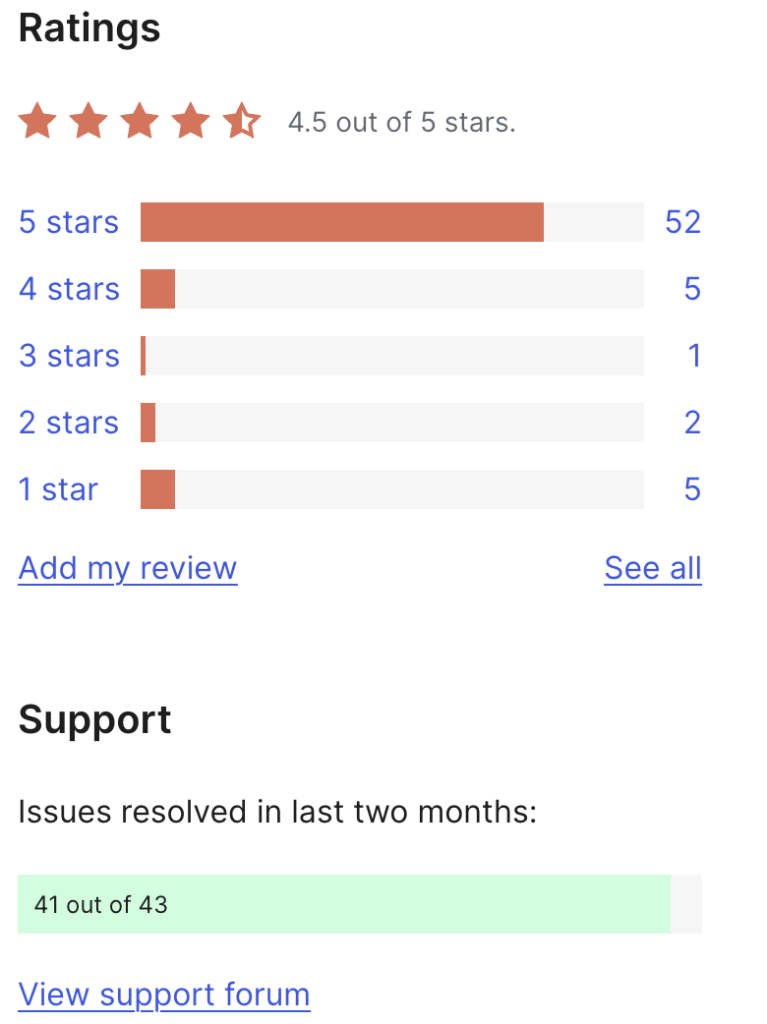
Why EventPrime Leads the Pack: The numbers speak for themselves—it’s among the most active plugins on WordPress.org today.
EventPrime stands out for its clean interface and strong architecture. As a modern WordPress event calendar plugin, it is more than just a calendar — it is a complete event planning system integrated deeply with WordPress. This makes it an excellent WordPress events plugin for organizers who want automation, ticketing, analytics, and full attendee management in one place.
EventPrime supports multiple ticket types with individual pricing, custom visibility settings, and a streamlined WooCommerce checkout experience.
On the attendee side, EventPrime includes customizable registration forms with conditional logic, automated confirmation emails, and instant QR code generation for fast event check-ins.
Promotional tools include real-time sales data, discount codes, early-bird offers, and group pricing. For payments, it integrates with PayPal, Stripe, and offline options, with SSL encryption for secure transactions.
Customization is simple with a drag-and-drop event builder featuring real-time previews. Responsive calendar layouts, including grid, list, and detailed event pages, help you display events anywhere on your site using shortcodes.
Behind the scenes, EventPrime uses WordPress custom post types and taxonomies to maintain high performance, even at scale.
Best for: Professionals and event organizers seeking a scalable, automation-ready WordPress events plugin with enterprise-level features.
The Events Calendar – Robust, Popular, and Highly Extendable
Created by StellarWP, The Events Calendar is one of the most widely used WordPress event calendar plugin solutions. Its reliability and flexibility make it ideal for universities, businesses, and corporate websites.
This plugin offers flexible scheduling, letting you set up one-time events, recurring activities, or events spanning several days. It’s even aware of different time zones, and integrates RSVP and ticketing features directly into the event workflow.
In terms of user experience, it provides a variety of calendar views—such as month, week, day, and agenda formats—alongside AJAX-powered search for instant filtering. It also integrates with Google Maps, making it easier for users to locate venues.
You can extend its functionality with powerful add-ons, including support for virtual meetings via Zoom or Google Meet. It also syncs with platforms like Eventbrite, WooCommerce, and Stripe. For developers, the REST API opens the door to building customized applications or integrations.
Best for: Teams or organizations that want a highly customizable, plug-and-play calendar solution with a strong frontend experience and support for additional modules.
Events Manager – Highly Configurable with Enterprise Capabilities
Events Manager is a robust WordPress event calendar plugin designed for more advanced use cases. Its flexibility makes it a strong choice for enterprises or platforms handling large numbers of events.
Its booking system allows for tailored forms with built-in validation, and you can configure multiple ticket types and pricing options to match your event’s needs. Exporting attendee data is straightforward thanks to built-in CSV support.
For multisite functionality, it’s fully compatible with WordPress Multisite installations and supports community involvement via BuddyPress integration. You can also enable frontend event submission, allowing users to contribute their own listings.
On the mapping side, it incorporates the Google Maps API, provides address autocomplete to improve accuracy, and lets you categorize venues using custom taxonomies for better filtering.
Best for: Large companies or networks handling numerous events or user-submitted content across multiple sites.
WP Event Manager – Lightweight Yet Powerful
WP Event Manager is a lightweight WordPress events plugin focused on simplicity and performance. It is optimized with AJAX-based search, responsive layouts, and caching for fast page loads.
It’s highly optimized for performance, featuring AJAX-based search tools that return instant results. Built-in caching helps speed up page loads, and the design is fully responsive to provide a smooth mobile experience — an important factor for any WordPress event calendar plugin.
From a user interaction standpoint, it supports guest submissions, with admin workflows for approval. You can personalize the layout using drag-and-drop tools and deploy customized widgets to match different parts of your site.
On the SEO front, the plugin generates search-friendly URLs and includes schema markup for structured data, helping your events perform better in search engine rankings.
Best for: Small teams, solo developers, or anyone looking for a modular event plugin that combines strong frontend tools with optional premium upgrades.
Event Organiser – A Developer-Oriented Plugin with Deep WordPress Integration
Event Organiser is designed for developers who prefer solutions that follow WordPress coding standards closely. As a developer-friendly WordPress events plugin, it provides extensive control over event creation and display.
It leverages WordPress custom post types for event content, and includes REST API support to enable custom development workflows. You can display events using shortcodes or widgets wherever needed.
Event Organiser also handles complex scheduling, including recurring events with specific rules. Venue information can be displayed using the Google Maps API, and attendees receive automatic email updates before events.
Customization is a breeze for developers, thanks to an array of hooks and filters. You can create fully customized event templates and even use WP CLI to manage events in bulk via the command line.
Best for: Developers or advanced users who need total control over the structure, display, and behavior of their event management system.
Conclusion: Choose What Works Best for Your Goals
Each plugin in this list offers something unique. However, if you want the most complete and future-ready solution, EventPrime is our top recommendation. As a strong WordPress events plugin, it offers intuitive design, automation tools, excellent WooCommerce integration, and high scalability — making it one of the most capable WordPress event calendar plugin options available today.
That said, other plugins may be better if your priorities include frontend design, community engagement, or enterprise-level flexibility – but EventPrime is catching up fast on these aspects of WordPress events plugin. Choose the one that suits your project needs — whether that means advanced customization for developers, simple event listings, or a full booking and ticketing system.
With the right tool, you will streamline your event management and deliver a smooth, engaging experience to your users from start to finish.